
How to Optimize Your LinkedIn Profile for Recruiters in 2026
Your LinkedIn profile isn't just an online CV.
For many job seekers, it is also a searchable professional profile that recruiters can discover when looking for specific skills, experience, job titles and locations.
LinkedIn says recruiters using LinkedIn Recruiter can search for candidates using criteria such as job titles, skills, locations and other profile information. LinkedIn has also expanded Recruiter with AI-assisted search that allows recruiters to describe the type of candidate they're looking for in natural language.
That means one simple question matters:
Can a recruiter quickly understand what you do and what you can offer?
If your profile says:
"Experienced professional looking for new opportunities."
you aren't giving recruiters much useful information.
Compare that with:
Digital Marketing Specialist | SEO | Google Ads | Meta Ads | Content Strategy | Lead Generation
The second version immediately communicates a professional identity and relevant search terms.
That's the basic idea behind LinkedIn profile optimization.
Is LinkedIn Really a Search Engine?
In many ways, yes.
Recruiters don't necessarily browse profiles randomly.
They may search for a combination of:
Job title
Skills
Location
Industry
Experience
Education
Seniority
Employment history
Open-to-work status
LinkedIn's Recruiter product supports searching and filtering candidates based on skills and other criteria, while newer AI-assisted search can interpret natural-language hiring requirements.
But there's an important distinction:
There is no publicly documented formula that says "put this keyword in your headline and you will rank #1."
LinkedIn says its people-search relevance system is proprietary and can consider signals including the searcher's activity, the match between the profile and query, similar search patterns and search history.
So don't try to "hack the algorithm."
Instead, make your profile easy to understand and relevant to the jobs you actually want.
1. Start With Your LinkedIn Headline
Your headline is one of the first things people see.
Don't waste it on:
"Looking for opportunities."
or:
"Hardworking and passionate professional."
These phrases don't tell a recruiter what you actually do.
Instead, use this structure:
Job Title + Core Skills + Professional Value
For example:
Digital Marketing Specialist | SEO | Google Ads | Meta Ads | Content Strategy
For a software developer:
Full Stack Developer | React | Next.js | TypeScript | Node.js
For an accountant:
Accountant | GST | Tally Prime | Financial Reporting | Advanced Excel
For a graphic designer:
Graphic Designer | Branding | Photoshop | Illustrator | Social Media Design
The keywords should accurately represent your real skills and experience.
LinkedIn itself warns that adding more keywords doesn't automatically improve search visibility and recommends avoiding keyword stuffing.
The rule is simple:
Use the words recruiters actually use for your target role—but don't turn your headline into a keyword list.
2. Choose One Clear Professional Identity
A common LinkedIn mistake is trying to appear suitable for everything.
For example:
Digital Marketer | Graphic Designer | Web Developer | HR | Data Analyst | SEO Expert | Video Editor | AI Expert
This may look impressive at first.
But it creates a problem.
What job are you actually looking for?
Instead, decide what your primary professional positioning should be.
If you're targeting digital marketing:
Digital Marketing Specialist | SEO | Google Ads | Meta Ads | Lead Generation
Then your other relevant abilities can appear naturally in your About, Experience and Skills sections.
Your profile should tell one coherent professional story.
3. Build an About Section That Recruiters Can Understand
Don't turn your About section into a biography.
A useful structure is:
Opening
Who are you professionally?
Expertise
What do you specialize in?
Evidence
What have you actually achieved or worked on?
Skills
Which relevant tools and capabilities do you have?
Career Direction
What type of opportunity are you looking for?
For example:
I am a Digital Marketing Specialist focused on SEO, paid advertising and content strategy.
I work with businesses to improve their online visibility, generate qualified leads and build consistent digital marketing systems.
My experience includes SEO, Google Ads, Meta Ads, social media strategy, content creation and website optimization.
Core skills: SEO, Google Ads, Meta Ads, WordPress, Content Strategy, Google Analytics, Search Console and Lead Generation.
I am interested in opportunities where I can combine digital marketing strategy with data-driven growth.
Notice what this does.
It doesn't say:
"I am hardworking, passionate and dedicated."
It tells the reader what you actually do.
4. Optimize Your Experience Section
This is where many LinkedIn profiles become unnecessarily generic.
Don't write:
Responsible for managing social media accounts.
Instead, explain:
What you did + How you did it + What happened
For example:
Managed Instagram, Facebook and YouTube content strategies, including content planning, creative development and performance tracking.
Even better when you have a genuine measurable result:
Managed social media content and paid campaigns across multiple platforms, increasing qualified website traffic by 32% over six months.
Only use numbers you can verify.
Never invent metrics simply to make your LinkedIn profile look stronger.
5. Use Job-Relevant Keywords Naturally
Suppose you're applying for:
Digital Marketing Specialist
The job description repeatedly mentions:
SEO
Google Ads
Meta Ads
Google Analytics
Content Marketing
Lead Generation
If you genuinely have those skills, make sure they appear naturally across relevant parts of your profile.
For example:
Headline
Digital Marketing Specialist | SEO | Google Ads | Meta Ads
About
Mention your experience with SEO, paid advertising and content strategy.
Experience
Explain how you used those skills in actual projects.
Skills
Add the relevant skills you genuinely possess.
This creates a consistent profile.
6. Don't Stuff Your Profile With Keywords
More keywords do not automatically mean more visibility.
LinkedIn explicitly advises members to use keywords that accurately reflect their expertise and experience while avoiding keyword stuffing.
Bad example:
SEO SEO SEO Google Ads SEO Digital Marketing SEO Marketing Google Ads Marketing SEO
Good example:
Digital Marketing Specialist with experience in SEO, Google Ads, Meta Ads and content strategy.
Relevance beats repetition.
7. Use the Skills Section Properly
LinkedIn says that adding relevant skills helps people understand your strengths and can improve the likelihood of being found in searches.
Don't add every skill you've ever heard of.
Instead, choose skills that match:
Your actual experience
Your target job
The tools you genuinely use
The terminology used in relevant job descriptions
For example, a web developer might include:
JavaScript
React.js
Next.js
TypeScript
Node.js
Git
REST APIs
A digital marketer might include:
Search Engine Optimization
Google Ads
Meta Ads
Content Marketing
Google Analytics
Social Media Marketing
Lead Generation
8. Turn on Open to Work Carefully
LinkedIn currently allows you to specify that you're open to work and choose who can see that information.
You can select:
All LinkedIn Members
or
Recruiters Only
LinkedIn says the Recruiters Only option allows LinkedIn Recruiter users to see your career interests, and LinkedIn takes steps to prevent recruiters at your current company from seeing that signal. However, LinkedIn also says it cannot guarantee complete privacy.
So don't write:
"Recruiters at my company can never see this."
That's too absolute.
Instead, understand the privacy limitation before enabling the feature.
For people in India, LinkedIn currently allows Open to Work users to provide information such as notice period/availability and expected annual salary, with that information visible to recruiters.
9. Make Your Profile Publicly Discoverable
Your LinkedIn profile can appear in search engines such as Google and Bing depending on your public-profile settings.
LinkedIn allows users to control which profile sections are publicly visible.
This matters because a recruiter—or even a hiring manager—may search your name outside LinkedIn.
Review your:
Public profile visibility
Headline
Profile photo
Current position
Experience
Skills
Remember that changes to public search visibility may take weeks or months to appear in external search engines.
10. Add Evidence of Your Work
A profile becomes much stronger when it shows evidence instead of simply making claims.
Depending on your profession, consider adding:
Projects
Portfolio links
Certifications
Publications
Presentations
Case studies
Work samples
Relevant courses
Recommendations
LinkedIn supports sections for projects, certifications, publications, languages, courses and recommendations, among others.
For example, instead of:
"Expert in graphic design."
show:
Brand identity project for XYZ company
Social media campaign designs
Website UI project
Portfolio link
Proof is more useful than adjectives.
11. Write Your Profile for Humans, Not Just Search
This is where many "LinkedIn SEO" guides go wrong.
A recruiter may discover you through search, but eventually a human will read your profile.
Imagine your profile contains:
SEO, SEM, SMM, PPC, Google Ads, Meta Ads, Content, Marketing, SEO, Digital Marketing...
It may contain relevant terms.
But it doesn't communicate much.
Instead:
I help businesses increase online visibility through SEO, paid advertising and content strategy, with a focus on measurable lead generation.
The keywords are still there.
But now there's a clear professional message.
12. Build Your Network Around Your Target Career
Your LinkedIn network can help you discover opportunities, industry discussions and relevant professionals.
But don't connect with thousands of people randomly just to increase your connection count.
Instead, connect with:
Recruiters in your industry
Hiring managers
Professionals in your target role
Alumni
Industry experts
Former colleagues
People working at companies you're genuinely interested in
Then participate naturally in relevant conversations.
The goal isn't simply:
More connections.
It's:
More relevant professional relationships.
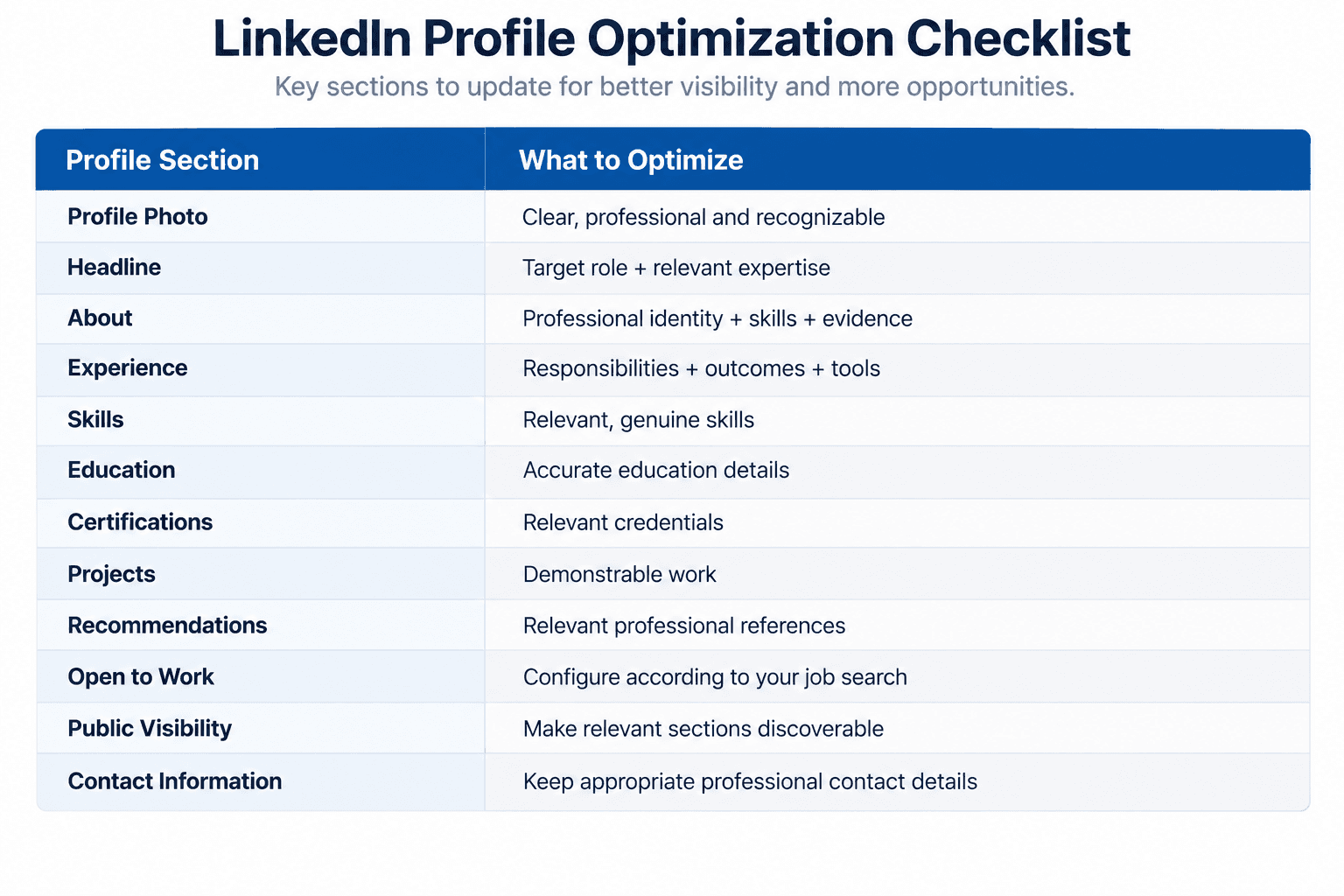
A Simple LinkedIn Profile Optimization Checklist
Before and After: LinkedIn Headline
Weak
Looking for new opportunities | Hardworking Professional
Better
Digital Marketing Specialist | SEO | Google Ads | Meta Ads | Content Strategy
Why?
The second headline immediately communicates:
Role → Skills → Area of expertise
That's much more useful to someone searching for a candidate.
A 30-Minute LinkedIn Optimization Plan
You don't need to rebuild your entire profile in one day.
0–5 Minutes
Define your target job title.
5–10 Minutes
Rewrite your headline.
10–15 Minutes
Rewrite the first part of your About section.
15–20 Minutes
Review your most recent experience.
Replace generic responsibilities with specific work and outcomes.
20–25 Minutes
Review your Skills section.
Remove irrelevant skills and add genuine, job-relevant ones.
25–30 Minutes
Review:
Open to Work
Public profile visibility
Location
Contact information
Portfolio links
Then view your profile as another person would see it.
Ask:
"If I were hiring for my target role, would I immediately understand what this person does?"
If the answer is no, simplify it.
The Real Goal of LinkedIn Optimization
Optimizing your LinkedIn profile isn't about finding a secret algorithm trick.
There isn't a guaranteed formula that will produce a specific number of recruiter messages every week.
LinkedIn's own documentation describes search relevance as proprietary and personalized, and it explicitly warns against keyword stuffing.
The practical goal is simpler:
Make your profile relevant, searchable, credible and easy to understand.
A recruiter should be able to answer three questions quickly:
What does this person do?
What skills do they have?
Do those skills match what I'm hiring for?
If your profile answers those questions clearly, you've removed unnecessary friction from the discovery process.
FAQ
How do I optimize my LinkedIn profile for recruiters?
Focus on a clear headline, relevant keywords, detailed experience, genuine skills, evidence of your work and appropriate Open to Work settings.
How do recruiters find candidates on LinkedIn?
LinkedIn Recruiter allows recruiters to search and filter candidates using information such as skills, job titles, locations and other criteria. LinkedIn has also introduced AI-assisted search that can interpret natural-language hiring requirements.
Should I put keywords in my LinkedIn headline?
Yes, if they accurately describe your role and expertise. Avoid repeating keywords unnaturally. LinkedIn specifically advises against keyword stuffing.
Should I turn on Open to Work?
If you're actively looking, it can help communicate your job-search status to recruiters. You can choose Recruiters Only or All LinkedIn Members, subject to LinkedIn's privacy limitations.
Does LinkedIn SEO guarantee recruiter messages?
No. Profile optimization can improve how clearly your experience and skills are represented, but there is no guaranteed number of recruiter messages.