
Professional Email Etiquette: 10 Essential Rules and Templates Every Fresher Should Know
Starting your first job comes with a lot of small changes. You may already know how to use email, but writing an email professionally in a workplace is a different skill.
A casual message that works perfectly on WhatsApp may sound inappropriate when sent to your manager, HR team, client, or senior colleague. A vague subject line, missing attachment, overly long explanation, or poorly worded request can make even a simple task more difficult.
The good news is that professional email writing doesn't require complicated English.
It requires clarity, context, courtesy, and the ability to make the reader's job easier.
Whether you're a fresher, intern, job seeker, or early-career professional, understanding basic professional email etiquette can help you communicate more confidently and build credibility at work.
In this guide, you'll learn the essential rules of workplace email communication, common mistakes to avoid, and practical email templates you can adapt to everyday situations.
What Is Professional Email Etiquette?
Professional email etiquette refers to the standards and habits that help you communicate clearly, respectfully, and effectively through workplace email.
It includes everything from your subject line and greeting to the way you structure your message, use Cc, attach files, request action, and close the email.
Good workplace email etiquette should answer three basic questions quickly:
Why am I receiving this email?
What information do I need to know?
What action, if any, is expected from me?
If your reader can understand these points without searching through a long paragraph, your email is already doing its job.
10 Essential Rules of Professional Email Etiquette
1. Write a Clear and Specific Subject Line
Your subject line is the first thing the recipient sees.
Avoid vague subjects such as:
"Update"
"Important"
"Hello"
"Regarding work"
"Need help"
Instead, make the purpose immediately obvious.
Better examples:
[Action Required] Approval Needed for Project Proposal[Review Request] Website Content – Final Draft[Update] Weekly Marketing Project Status[Question] Clarification on Assignment Requirements
A useful subject line saves the recipient time and makes your email easier to find later.
SEO Tip for Workplace Communication
This is one reason phrases such as professional email subject lines, work email writing tips, and how to write a professional email are closely connected. The objective is not to sound formal for the sake of sounding formal; it is to make communication easier.
2. Start With the Main Point
Don't make your manager or colleague read an entire paragraph before discovering what you need.
Start with the purpose of your email.
For example:
Less effective:
I hope you're doing well. I wanted to discuss something regarding the project because we have been working on it for the last few days and there are a few things that we need to clarify...
Better:
I'm writing to confirm the final requirements for the project before we begin implementation.
The second version immediately establishes the purpose.
For longer workplace emails, use a simple structure:
Purpose → Context → Required Action → Deadline
This approach keeps your message professional and easy to scan.
3. Use a Professional but Natural Tone
Professional does not mean robotic.
You don't need to write:
"I hereby wish to request your kind consideration regarding the aforementioned matter."
That's unnecessarily formal.
A natural workplace version is:
"Could you please confirm whether this approach works for the project?"
Your tone should generally be:
Polite
Direct
Respectful
Neutral
Solution-oriented
Avoid overly casual expressions such as:
"Hey bro"
"What's up?"
"Do this ASAP"
"I need this now"
"Why haven't you replied?"
Even when you're communicating with someone you know well, remember that workplace emails can be forwarded, stored, and reviewed later.
4. Keep Emails Concise
Long emails aren't automatically professional.
If a message can be communicated in five sentences, don't turn it into fifteen.
Before sending, remove:
Repeated information
Unnecessary background
Long introductions
Irrelevant explanations
Information the recipient already knows
However, don't remove context simply to make the email shorter.
The goal is not the shortest email possible. The goal is the clearest email possible.
For multiple updates or questions, use bullet points.
This makes your message much easier to scan, especially when communicating project updates or several action items.
5. Use Cc and Reply All Carefully
Understanding email recipients is an important part of professional communication.
Use To for people who are directly responsible for the conversation or action.
Use Cc for people who need visibility but don't necessarily need to respond.
Use Bcc carefully, mainly when there is a legitimate reason to hide recipient addresses, such as certain types of group communication.
Before clicking Reply All, ask yourself:
"Does everyone on this email actually need my response?"
Unnecessary Reply All messages can create noise and make important communication harder to follow.
6. Double-Check Attachments and Links
One of the most common workplace email mistakes is saying:
"Please find the attached report."
...and then forgetting to attach the report.
Before sending an important email, quickly check:
Is the attachment included?
Is it the correct version?
Does the link work?
Does the recipient have access?
Is the file name professional?
Did I attach confidential information accidentally?
A file named finalfinal2NEW.pdf doesn't exactly inspire confidence.
Use descriptive file names such as:
Project_Report_September_2026.pdf
Small details like this contribute to professional communication.
7. Address the Recipient Appropriately
When you know the person's name, use it.
Examples:
Hi Priya,
Hello Mr. Sharma,
Hi Team,
For a first interaction with a senior professional, client, or external contact, choose a greeting that matches the relationship and workplace culture.
Avoid overly casual greetings in formal situations.
You also don't need to repeat the person's name throughout the email. One appropriate greeting is enough.
8. Make Requests Easy to Understand
If you need something from someone, don't make them guess what you're asking.
Instead of:
"Please check this."
Try:
"Could you please review the attached proposal and confirm whether the pricing section is approved by Thursday?"
The second version provides:
The action
The material
The specific area
The expected response
The deadline
This is especially useful when writing emails to managers, clients, or cross-functional teams.
9. Proofread Before You Click Send
A professional email doesn't need perfect grammar, but obvious mistakes can reduce clarity and credibility.
Before sending, check:
Recipient name
Subject line
Spelling
Grammar
Dates
Numbers
Attachments
Links
Tone
Pay special attention to names, company names, job titles, and project details.
For important emails, reading the message once aloud can help you notice awkward wording that you might miss while reading silently.
10. End With a Professional Sign-Off
Your closing should match the situation.
Common options include:
Best regards,
[Your Name]
Thanks,
[Your Name]
Kind regards,
[Your Name]
Best,
[Your Name]
For a quick internal request, "Thanks" may be perfectly appropriate.
For a formal external communication, "Best regards" or "Kind regards" can be a better choice.
3 Professional Email Templates for Freshers
Knowing the rules is useful, but freshers often need something more practical: what should I actually write?
Here are three adaptable workplace email examples.
Template 1: Asking a Senior Colleague for Help
Subject: [Quick Question] Clarification on [Project/Task Name]
Hi [Name],
I'm currently working on [Task/Project] and would like to confirm one point regarding [specific issue].
I have considered the following options:
Option A: [Brief explanation]
Option B: [Brief explanation]
Could you please confirm which approach would be more appropriate?
If it's easier, I'm also available for a quick discussion.
Thanks,
[Your Name]
Why this works
It gives the senior colleague enough context to answer without forcing them to ask several follow-up questions.
Template 2: Sending a Weekly Work Update
Subject: [Update] Weekly Status – [Project Name]
Hi [Manager/Team Name],
Here is a quick update on this week's progress:
Completed: [Task or achievement]
In Progress: [Current task and expected completion]
Blocker: [Issue, dependency, or "None"]
Next Step: [What you plan to work on next]
Please let me know if you'd like me to change any priorities for next week.
Best regards,
[Your Name]
Why this works
The recipient can understand your progress in seconds without reading a large block of text.
Template 3: Submitting Work for Review
Subject: [Review Request] [Project Name] Ready for Feedback
Hi [Name],
The first draft of [Project/Report/Presentation] is ready for review.
File/Link: [Insert link or mention attachment]
Key changes: [One or two important changes]
Feedback requested by: [Date/Time]
Please let me know if you'd like any changes before the final version is prepared.
Best,
[Your Name]
This format works particularly well when sending reports, presentations, designs, documents, or project deliverables.
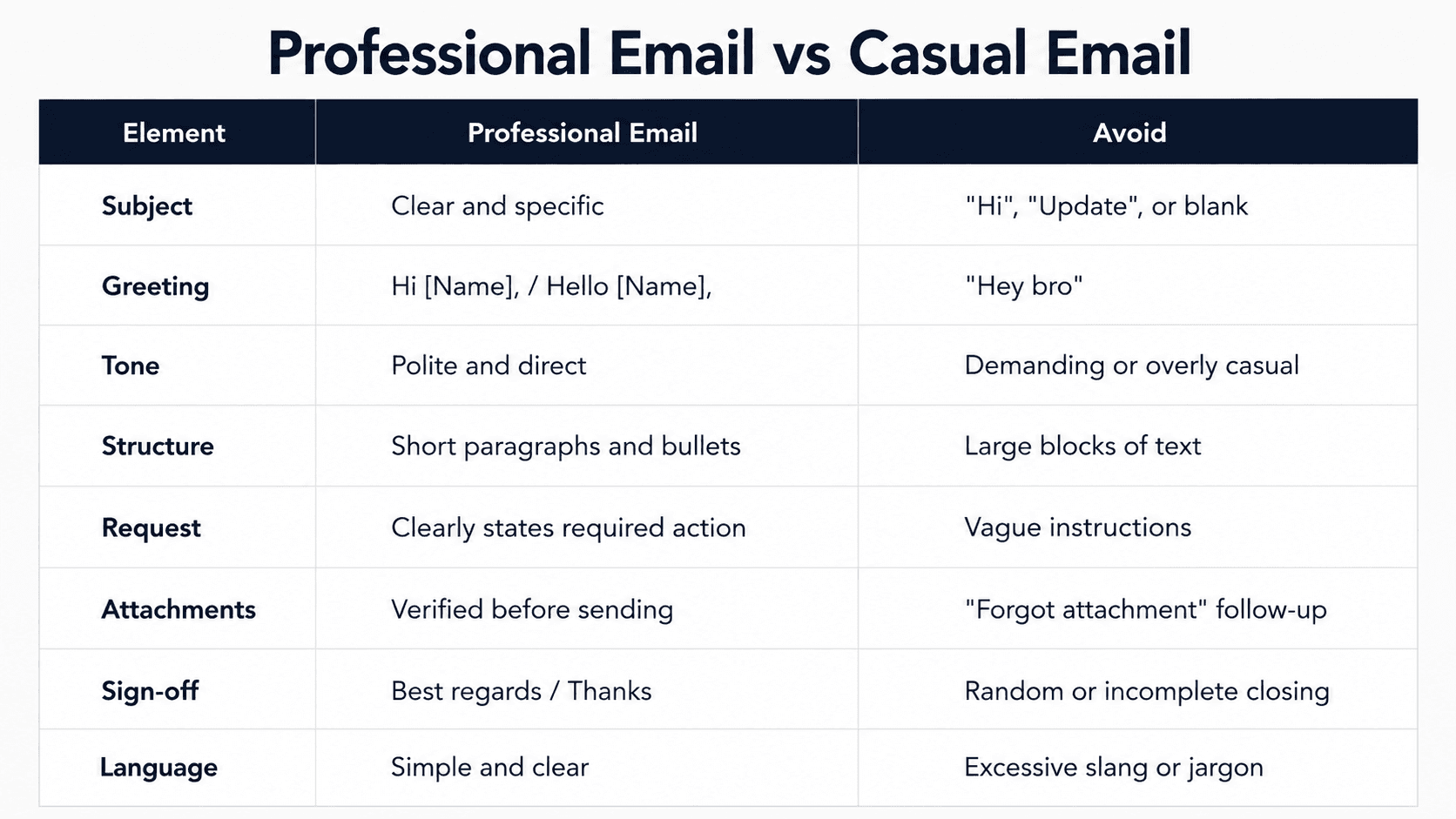
Professional Email vs Casual Email
Understanding the difference is especially important for freshers entering their first workplace.
Common Professional Email Mistakes Freshers Should Avoid
Even a well-intentioned email can create problems when these habits become routine.
Writing "Urgent" Without Explaining Why
If everything is urgent, nothing feels urgent.
Instead, explain the actual deadline:
"Could you please review this by 3 PM today so we can submit the final version?"
Sending One-Line Emails Without Context
"Please check."
"Do this."
"Any update?"
These messages may force the recipient to search through previous conversations to understand what you're referring to.
Give enough context to make your request understandable.
Using Too Many Exclamation Marks
"Please send the report ASAP!!!"
can sound aggressive or emotional.
A calmer version is:
"Could you please send the report by 4 PM today?"
Writing Emails When a Quick Conversation Would Be Better
Not every issue needs a long email. If a complicated problem requires ten back-and-forth messages, a short call or meeting may be more efficient.
Good communication includes knowing when email is the right channel and when it isn't.
A Simple Professional Email Checklist
Before clicking Send, ask yourself:
Purpose: Is the reason for the email immediately clear?
Subject: Does the subject accurately describe the message?
Clarity: Can the recipient understand what I need?
Tone: Does the email sound respectful and professional?
Action: Have I clearly stated what needs to happen?
Deadline: Have I mentioned the relevant date or time?
Attachments: Did I include every file I referenced?
Recipients: Does everyone in To and Cc actually need this email?
Proofreading: Did I check names, dates, numbers, spelling, and links?
If you can answer yes to these questions, your email is likely ready to send.
Final Thoughts
Professional email etiquette isn't about using sophisticated English or sounding extremely formal.
It's about respecting the reader's time and making your message easy to understand.
For freshers, this is one of the simplest workplace skills to improve because small changes can make a noticeable difference. A specific subject line, a clear opening sentence, useful bullet points, and a direct request can turn an ordinary email into effective professional communication.
You don't need to memorize dozens of templates either.
Learn the basic principles:
Be clear. Be concise. Give context. Be respectful. Make the required action obvious.
Once these habits become natural, you'll be able to write professional emails for managers, clients, colleagues, HR teams, and external contacts without depending on a template every time.
The best professional email is not the one that sounds the most impressive.
It's the one that helps the right person understand the right information and take the right action.
Frequently Asked Questions About Professional Email Etiquette
How do I write a professional email as a fresher?
Start with a clear subject line, use an appropriate greeting, explain your purpose early, provide relevant context, clearly state what you need, and finish with a professional sign-off. Keep the language simple and respectful.
What is the best email format for workplace communication?
A practical structure is Subject → Greeting → Purpose → Context → Action/Deadline → Closing → Signature. For multiple points, use bullet lists instead of long paragraphs.
How long should a professional work email be?
There is no universal word limit. Keep it as short as possible while including all information the recipient needs to understand and act on the message.
Is it okay to use "Hi" in a professional email?
Yes. "Hi [Name]" is widely suitable for everyday workplace communication. The appropriate level of formality depends on your relationship, workplace culture, and whether you're communicating internally or externally.
Should freshers use Cc in emails?
Yes, when someone genuinely needs visibility. Avoid adding people to Cc simply to make an email look more important or to unnecessarily involve people who don't need the information.