

How to Give a Technical Demo to Leadership: A Practical Guide
Presenting your work to senior leadership can feel intimidating, especially when you are an early-career software engineer, QA analyst, or data professional. You may have spent days solving technical problems, building features, or improving performance. However, if your audience cannot understand what you accomplished and why it matters, the value of your work may not be immediately clear.
Learning how to give a technical demo to leadership is about more than showing code. It means explaining the problem, demonstrating the solution, and connecting your work to user needs or business goals.
With the right preparation and communication, even a short sprint demo can help you build confidence and communicate your contributions more effectively.
1. Understand What Leadership Wants to See
Before preparing your presentation, consider who will attend. Engineering managers may care about technical quality, reliability, and delivery risks. Product managers may focus on customer experience, while business leaders may want to understand efficiency, costs, or commercial outcomes.
Your demonstration should answer three questions:
What problem were you trying to solve?
What have you built or improved?
Why does the result matter?
For example, instead of opening with, “I completed ticket PROD-4829,” explain the outcome: “We improved the onboarding workflow so customers can complete the initial setup with fewer manual steps.”
The second explanation gives the audience a reason to pay attention before you begin the demonstration.
2. Follow a Simple Four-Step Demo Structure
A clear structure helps you communicate confidently without overwhelming your audience with technical details.
Step 1: Introduce the problem
Spend the first 20–30 seconds explaining the challenge and its importance.
For example:
“Previously, users had to enter the same information across several screens. Today, I’ll demonstrate how the updated workflow reduces repetition and makes setup easier.”
Use verified facts whenever you mention time savings, customer complaints, revenue, or performance improvements. Never present estimates as confirmed results.
Step 2: Demonstrate the main workflow
Show the feature working through a realistic, relevant scenario. Focus on the steps that best explain the solution rather than clicking through every screen.
Prepare your demo environment in advance, use clean sample data, and increase screen zoom if necessary. Close unrelated browser tabs and notifications.
Instead of narrating every mouse movement, explain what the user can now accomplish and how the experience has improved.
Step 3: Explain an important technical decision
You do not need to explain the entire architecture. Highlight one technical decision that matters to reliability, security, performance, or maintainability.
For example:
“The upload process validates each file before processing it, allowing us to identify invalid records and provide useful feedback rather than failing the entire workflow.”
Keep the explanation relevant to your audience. Technical leaders may appreciate implementation details, while non-technical stakeholders usually need the practical implications.
Step 4: Close with results and next steps
Summarize what is complete, what remains, and what happens next.
For example:
“The core workflow is working in staging. We are now testing edge cases before the planned rollout. The next step is to validate the experience with our pilot users.”
If you have measured improvements, share the actual figures and explain how they were measured. If the impact is not yet known, state that clearly.
3. Technical Demo Best Practices: Before and After
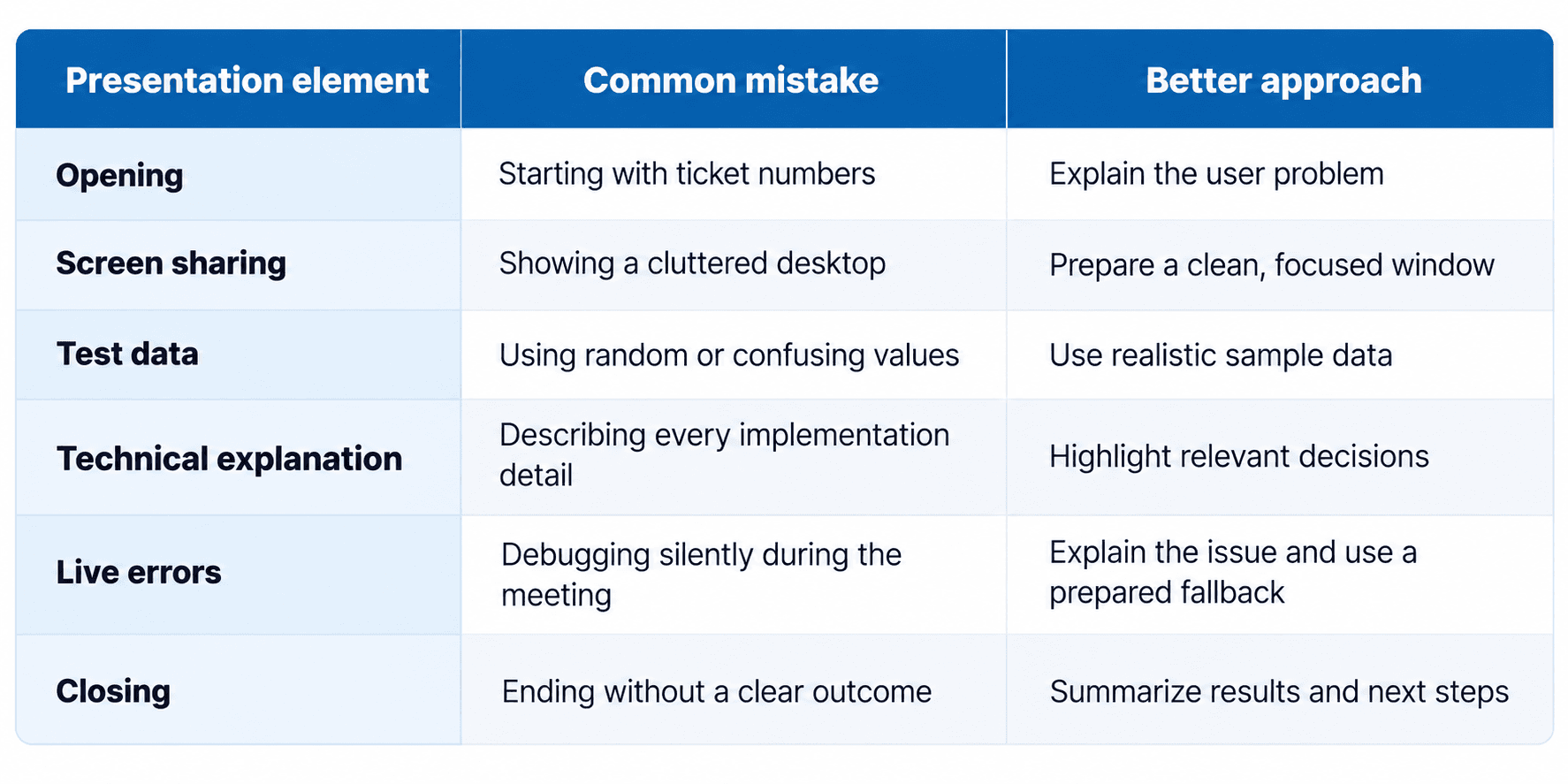
These engineering demo best practices help the audience understand your work without requiring everyone to have the same technical background.
4. Prepare for Live Demo Failures
Live environments can fail for reasons outside your control. A staging server may become unavailable, sample data may change, or an external service may respond unexpectedly.
A simple backup plan can prevent a technical issue from derailing your presentation.
Rehearse the workflow: Test the complete demonstration before the meeting.
Prepare a recording: Keep a short screen recording of the working flow available as a backup.
Use dedicated test data: Avoid relying on shared accounts that other people may modify.
Check your setup: Verify permissions, network connectivity, screen sharing, and display readability.
Plan a fallback: If the live demo fails, calmly switch to the recording or prepared screenshots.
If something goes wrong, avoid blaming colleagues or spending several minutes troubleshooting in front of the audience. Briefly explain the issue, show the prepared alternative, and follow up with the technical details afterward if necessary.
5. Avoid Common Presentation Mistakes
Apologizing before you begin: Avoid opening with statements such as, “This is unfinished, and several things are broken.” Explain the current scope honestly and focus on what the audience will see.
Live coding without a clear purpose: Editing code during a business-focused demo can distract from the outcome. If implementation details matter, prepare a short code example or architecture diagram in advance.
Using unexplained jargon: Terms such as API gateway, database migration, and asynchronous processing may be familiar to engineers but confusing to other stakeholders. Explain their practical significance in simple language.
Taking all the credit: Acknowledge the contributions of designers, testers, product managers, and other engineers. Good technical communication also demonstrates collaboration.
Guessing when asked a difficult question: If you do not know the answer, say so. Explain what you know, identify what needs verification, and commit to a reasonable follow-up.
For more guidance on building professional confidence, explore the UNIBLIP Early Career Hub.
6. How to Present Technical Work to Non-Technical Stakeholders
Not every technical project produces a visible interface. Backend improvements, infrastructure changes, testing automation, and data pipelines may require a different demonstration approach.
You can use:
A simple before-and-after architecture diagram.
An API request and a clearly formatted response.
A performance chart showing verified measurements.
A short workflow recording.
A table comparing the previous process with the improved one.
For example, if you optimized an API, explain how the change affects response time, reliability, or the user experience. Include measured performance figures only when you have reliable test results.
The goal is not to hide technical complexity. It is to make that complexity understandable and relevant.
Frequently Asked Questions
How long should a technical demo last?
For a small sprint feature, two to five minutes can be a useful starting point. Larger projects may require more time. Follow the meeting agenda and leave room for questions.
What if I feel nervous presenting to senior leaders?
Write down your opening sentences, rehearse aloud, and practice the demonstration at least once. Familiarity with the sequence can help you feel more prepared. Focus on explaining the work rather than delivering a perfect performance.
How do I demonstrate backend work without a user interface?
Use a simple architecture diagram, a clean API demonstration, a relevant dashboard, or verified performance results. Explain what changed and why it matters.
Can I present a feature that is not finished?
Yes, when a progress review or early preview is appropriate. Clearly identify what works, what remains incomplete, and any known risks. Never imply that unfinished functionality is production-ready.
What makes a technical demo effective?
An effective demo has a clear purpose, a relevant working example, understandable explanations, credible evidence of results, and a concise conclusion. It helps the audience understand both the solution and its significance.
Final Thoughts
A successful technical demo does not require an elaborate presentation or an impressive amount of code. It requires a clear explanation of the problem, a focused demonstration of the solution, and an honest account of the results.
As an early-career professional, practice connecting technical decisions to user needs, operational improvements, and business priorities. Prepare for questions, acknowledge your collaborators, and communicate limitations openly.
Over time, these habits can strengthen your presentation skills, improve cross-functional collaboration, and help others better understand the value of your engineering work.
Explore more practical career advice in the UNIBLIP Early Career Hub.