
Slack Fatigue: How to Reduce Digital Overload at Work
You open Slack to answer one message.
Then another notification appears.
A colleague asks a quick question. An email arrives. Someone tags you in a project channel. Your calendar reminds you about a meeting in ten minutes.
You answer one message, switch to another task, return to your document, check Slack again—and suddenly an hour has disappeared.
At the end of the workday, you may feel like you were busy all day without completing the work that actually mattered.
This is where Slack fatigue, context switching and digital overload at work become a real productivity problem.
The solution isn't necessarily to stop using Slack or other workplace communication tools. The bigger issue is how often they interrupt your attention and how your team expects you to respond.
What Is Slack Fatigue?
Slack fatigue is the mental exhaustion that can develop when workplace messaging creates a constant stream of notifications, conversations, mentions and requests.
It's not simply about receiving too many messages.
It's about feeling that you need to watch, process and respond to those messages immediately.
That creates an always-available work pattern.
Microsoft's 2025 Work Trend Index reported that, among the high-volume users it analyzed, employees were interrupted by meetings, emails or chats roughly every two minutes during core work hours. The underlying Microsoft 365 telemetry covered aggregated and anonymized productivity signals, so this shouldn't be treated as a universal experience for every worker.
But the underlying problem is easy to recognize:
Your attention keeps getting pulled away from the task in front of you.
And every interruption creates another context switch.
Why Context Switching Makes Work Feel Harder
Imagine you're writing a report.
You're completely focused on one paragraph when Slack pops up.
You quickly read the message.
You reply.
Then you return to the report.
But now you have to remember:
"Where was I?"
That small mental reset happens repeatedly throughout the day.
Research discussed by UC Irvine's Gloria Mark has reported that returning to an interrupted task can take substantially longer than the interruption itself. One widely cited figure is 23 minutes and 15 seconds, although it should not be interpreted as a fixed recovery time for every person or every interruption.
This is why a five-second notification can cost more than five seconds.
The real cost is the attention you lose before returning to meaningful work.
Digital Overload Isn't Just a Slack Problem
Slack may be the most visible source of workplace interruptions, but it is rarely the only one.
Your attention might be divided between:
Slack or Microsoft Teams
Email
WhatsApp
Zoom or Google Meet
Project management tools
Calendar reminders
CRM notifications
Browser tabs
Mobile notifications
Internal dashboards
The result is a fragmented workday.
You aren't necessarily working on too many difficult tasks.
You're constantly switching between small pieces of information.
That's what makes digital overload so difficult to notice.
You can spend eight hours responding to things and still have very little uninterrupted time for actual creation, analysis or problem-solving.
5 Signs You May Have Notification Fatigue
You don't need to delete every workplace app.
Start by looking at your behaviour.
1. You check Slack without thinking
You finish one task and immediately open Slack—even when you don't have a specific reason.
2. You feel uncomfortable when messages remain unread
An unread notification starts feeling like an unfinished task.
3. You interrupt important work to answer minor messages
A message that could have waited 30 minutes suddenly feels urgent.
4. You send and receive many short messages
"Hey."
"Are you free?"
"Quick question."
"Did you see this?"
These messages may seem harmless individually, but they create more communication loops.
5. You finish the day feeling busy but unproductive
Your inbox is cleaner.
Your Slack messages are answered.
Your meetings are finished.
But your most important project barely moved.
That's often a sign that your workday has become reaction-driven instead of outcome-driven.
How to Reduce Digital Overload at Work
You don't need a complicated productivity system.
Start with these five changes.
1. Create Dedicated Deep-Work Hours
Choose one or two periods when you protect yourself from unnecessary interruptions.
For example:
9:30 AM – 11:30 AM: Deep Work
During this period:
Turn off non-essential notifications
Close unnecessary communication tabs
Avoid checking Slack continuously
Work on one important task
Allow only genuinely urgent interruptions
You can also use a simple Slack status:
Deep work until 11:30 AM. I'll check messages after that. For urgent issues, please call.
The important part is communicating the expectation instead of simply disappearing.
2. Stop Treating Every Message as Urgent
Not every message requires an immediate response.
Create three categories:
Urgent
Something that is blocking production, a customer, security or a genuine business emergency.
Response: Immediately.
Important
Something that needs attention today but isn't blocking work.
Response: Within your team's agreed response window.
Routine
Questions, updates, FYIs and general discussions.
Response: During your next communication block.
This simple distinction can dramatically reduce notification anxiety.
3. Use Asynchronous Communication Properly
Asynchronous communication doesn't mean ignoring people.
It means allowing people to respond when they can give the issue proper attention.
Instead of:
"Hey"
followed five minutes later by:
"Are you free?"
and then:
"Need to ask something about the client."
Send the complete request:
"Hi Sarah, I need your feedback on Section 3 of the client audit. The draft is here: [link]. Could you review it by Thursday at 2 PM? Nothing is blocked on my side."
One message.
Clear context.
Clear action.
Clear deadline.
That's much easier to process.
4. Batch Your Messages
Instead of checking Slack every few minutes, try scheduled communication blocks.
For example:
10:00 AM — 15 minutes
Check Slack and email.
1:00 PM — 20 minutes
Process messages and follow-ups.
4:00 PM — 20 minutes
Final communication check.
Your exact schedule should depend on your role.
A customer-support employee may need frequent monitoring.
A designer, developer, writer or analyst may be able to protect longer focus periods.
The goal isn't "never check Slack."
The goal is:
Don't let Slack decide when you switch tasks.
5. Reduce Notification Noise
Go through your notification settings and ask one question:
"Does this notification require me to act immediately?"
If the answer is no, consider turning it off.
You can reduce:
Desktop pop-ups
Notification sounds
Mobile alerts
Non-essential channel notifications
Email alerts for routine activity
Repeated calendar reminders
Keep notifications for genuinely time-sensitive situations.
This changes your relationship with technology.
Instead of technology saying:
"Look at me now."
You decide:
"I'll check when I'm ready."
Slack Fatigue vs. Healthy Communication
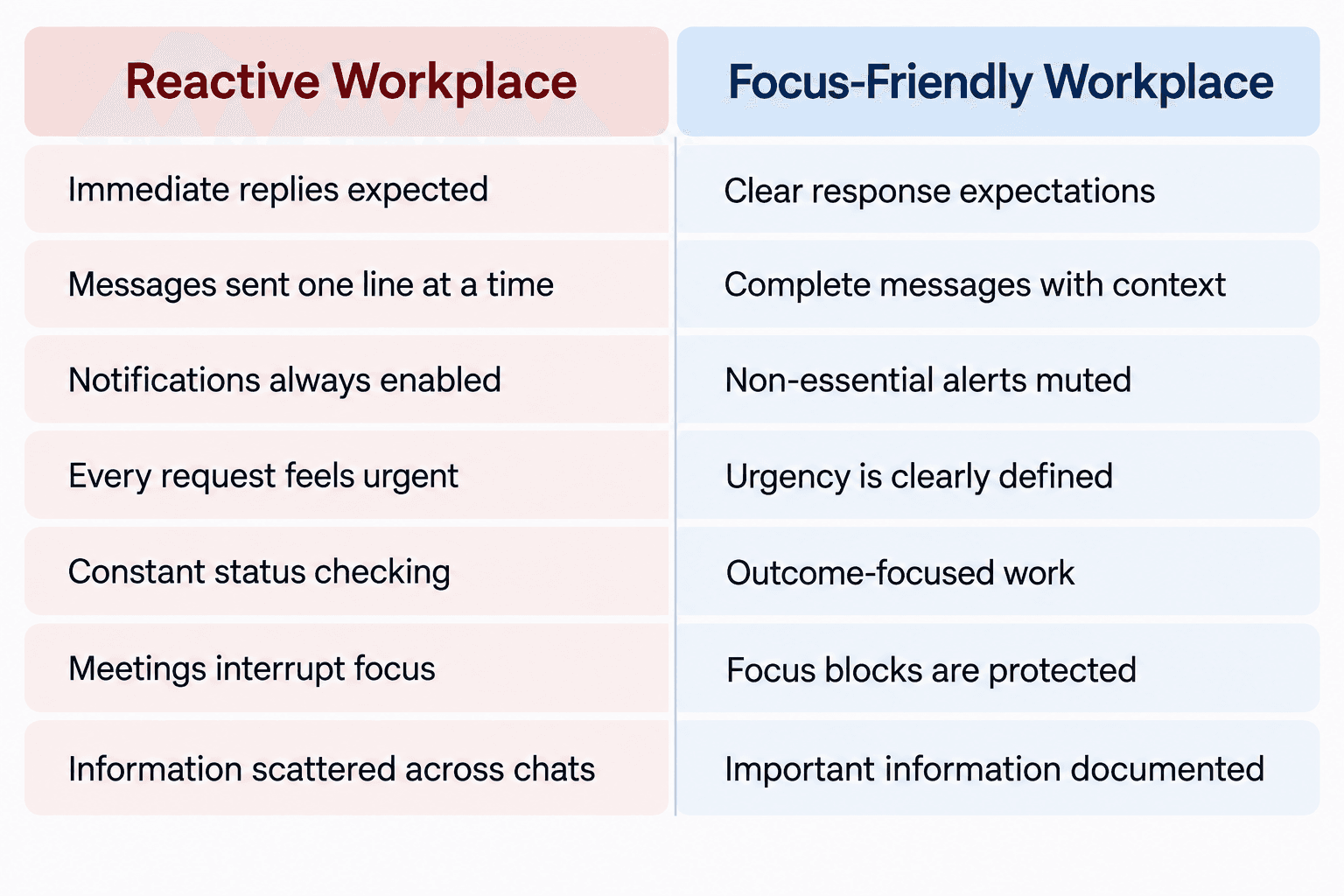
The goal isn't to create a workplace where nobody communicates.
It's to create a workplace where communication supports work instead of becoming the work.
A Simple 7-Day Digital Overload Reset
Want to test this without changing your entire workflow?
Try this for one week.
Day 1
Record how often you check Slack and email.
Don't change anything yet.
Day 2
Turn off unnecessary notification sounds.
Day 3
Create one 60-minute deep-work block.
Day 4
Start sending complete messages instead of fragmented messages.
Day 5
Create an agreed definition of "urgent" with your team.
Day 6
Add two communication blocks to your calendar.
Day 7
Review your week.
Ask yourself:
Did I complete more meaningful work?
Did I feel less distracted?
Did urgent issues actually suffer?
Which notifications were unnecessary?
Which communication habits should stay?
You don't need to become completely unreachable.
You need to become intentional about when you're reachable.
The Real Goal Isn't Less Communication
Technology isn't the enemy.
Slack, email, Teams and other collaboration tools can make distributed teams faster and more connected.
The problem starts when constant availability becomes confused with productivity.
A person can reply to 100 messages and still make little progress on their most important project.
Another person might spend two uninterrupted hours solving a difficult problem and produce something that moves the entire project forward.
Modern work needs both communication and concentration.
The answer is not to eliminate digital communication.
It's to give deep work and communication their own space.
Start with one change today:
Turn off non-essential notifications and protect your next 60 minutes for one important task.
Your inbox can wait.
Your most important work shouldn't always have to.
FAQ: Slack Fatigue & Digital Overload
What is Slack fatigue?
Slack fatigue is the mental strain associated with continuous workplace messaging, notifications, mentions and the expectation of frequent responses.
How can I reduce digital overload at work?
Start by reducing unnecessary notifications, creating focus blocks, batching communication and establishing clear expectations around urgent versus non-urgent messages.
Is asynchronous communication better than Slack?
They're not opposites. Slack can support asynchronous communication when people don't expect immediate responses. The important factor is the communication norm, not simply the software being used.
How do I stop checking Slack constantly?
Turn off non-essential alerts, close Slack during focus blocks and create specific times for checking messages. If your role requires immediate responses, establish which channels or messages genuinely require them.
Does context switching affect productivity?
Frequent switching can fragment attention and increase the time required to return to a task. The effect varies by person, task and interruption, so there isn't one universal time cost for every interruption.